OpenAI sells a $230 keypad to run AI agents. I built one for $28 on Linux.
OpenAI’s first hardware is a $230 keypad for driving AI coding agents. I rebuilt the part that matters — voice dictation and one-press agent commands — for $28, on Linux, with...
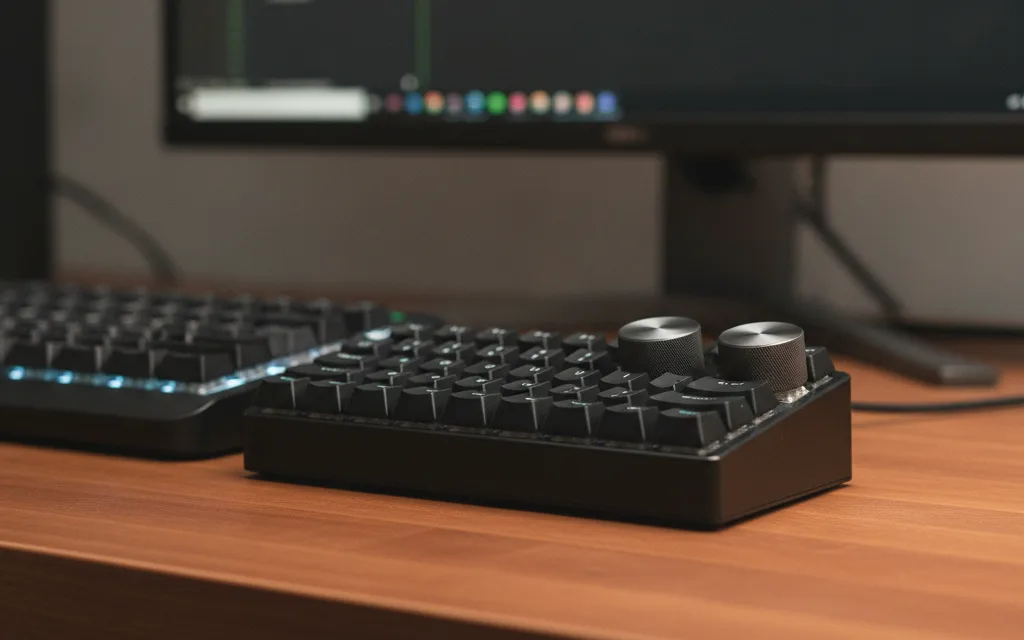
Two weeks ago OpenAI shipped its first piece of hardware: the $230 Codex Micro — a little keypad for driving AI coding agents, with voice input, keys to accept or reject code, and RGB lights that glow with each agent's status. I rebuilt the part that matters for $28, on Linux, with a cheap Chinese macropad and a bit of glue.
Mine does not have the milled-aluminium body or the per-key status lights — that is the $202 I did not spend. What it does have is the actual workflow: I hold a key and talk to my coding agent, I tap another and it fires the command I would have typed by hand. Same idea, a fraction of the price, and it runs where I work.
How I drive coding agents with twelve keys and a dial
Hold to talk. The key I use most is a push-to-talk button wired to my own local speech-to-text server — GPU-accelerated, running NVIDIA's Nemotron streaming ASR model, so it handles English and Italian without sending my voice to anyone's cloud. Hold it, talk, release, and the transcript lands where my cursor is. A small listener grabs the key at the evdev level, so that one does not even need a desktop shortcut. This is the same "voice input" the Codex Micro advertises — on hardware that cost less than lunch for two.
One-press commands. The second row types the phrases I send agents a hundred times a day: the left key types go ahead, continue; the middle one merge the pull request, please; the right one stop. Same trick as the knobs — each key sends a single spare keysym, a desktop shortcut catches it, and a tiny script types the full phrase with xdotool. The wording lives in that script, so I change it without reflashing the device. The top row rounds it out: dictate → paste → send (push-to-talk, Ctrl+Shift+V, Enter).
The gotcha that cost me a very bad ten minutes: my first version had each key send a modifier chord (Ctrl+Alt+Shift+a letter). Press it once and the modifiers latched stuck at the X server level — from then on every keystroke was a chord. F1 opened Chrome, windows vanished, my real keyboard's shortcuts died, and the pad's LED just sat there red. A single spare keysym with no modifiers can't do that — which is exactly why the knobs never misbehaved. The lesson: a macro key wired to a global shortcut should send a plain spare keysym, not a modifier chord — that's what latched. (An ordinary app shortcut like Ctrl+Shift+V for paste, sent straight to the focused window, is fine.)
The hardware: $28, and any brand works
This is the same pad sold under a dozen brands — 12 keys and two rotary knobs, wired over USB-C. What matters is how it shows up on USB:
ID 1189:8840 USB Composite DeviceIf yours enumerates like that, everything here works for you too. This is the exact unit I used: 🛒 Mini macropad — 12 keys + 2 knobs.
That is an Amazon affiliate link — buying through it supports this blog at no extra cost to you.
The classic catch with these pads is that the official configuration software is Windows only, downloaded from a site nobody has ever heard of. You do not need it. The mapping is written straight to the device over USB and stored on the device, so it survives reboots and needs nothing running in the background.
Writing to the device: ch57x-keyboard-tool
The pad is based on the CH57x chip, and ch57x-keyboard-tool by kriomant (a Rust CLI) programs it from Linux. Two things to know:
- It only writes, never reads. Every upload overwrites the whole map, so your YAML config is the single source of truth — keep it in git.
- The map lives on the device. Once flashed it works on any machine, even without the tool installed.
ch57x-keyboard-tool validate < macropad.yaml
sudo ch57x-keyboard-tool upload  < macropad.yaml   # the USB write needs root
One quirk if you remap the keys yourself: the firmware scrambles the physical layout — the top-left key is not row 0, column 0 in the file. I decoded mine by flashing 12 distinct letters and pressing the keys in order to see which was which. The knob keys, though, are the fun part.
Bonus: the two knobs became my speaker and mic volume
While I was at it, the two dials became system audio: left knob for speaker volume (press to mute), right knob for the microphone. Each turn pops a clean notification like 🎤 Microphone 75% or 🔊 Speakers MUTED.
The trick: the device can only emit standard HID key codes, and there is no HID code for "microphone volume". So each knob action sends a spare key (F13–F18), and the desktop turns that key into an audio command — a small helper runs one wpctl action on the default sink/source (PipeWire) and shows the notification. It targets @DEFAULT_AUDIO_SINK@ / @DEFAULT_AUDIO_SOURCE@, so it follows whatever output/input you are using.
The trap that cost me an afternoon: F20 is already "mute mic"
The obvious first attempt is to map the mic knob to F19/F20/F21. It does not work: you turn the knob and the microphone mutes and unmutes, but the volume never moves.
On a standard Linux/Xorg evdev keymap, the high function keys are not plain function keys. Check yours:
xmodmap -pke | grep -Ei 'F1[3-9]|F2[0-4]|Launch|AudioMic|Touchpad'You typically find:
keycode 198 = XF86AudioMicMute      # this is "F20"
keycode 199 = XF86TouchpadToggle    # "F21"
keycode 200 = XF86TouchpadOn        # "F22"
So F20 is the system "mute microphone" key — a global handler grabs it before any custom shortcut runs. F21/F22 are touchpad toggles; F19/F24 are often unmapped. The fix is to use only the spare, side-effect-free keysyms — XF86Tools and XF86Launch5–XF86Launch9 (the F13–F18 range) — which have no default handler.
One more warning: testing with xdotool key F20 is misleading. It injects a keysym named F20 at the X level, which hits your custom shortcut — while the physical key emits keycode 198 = XF86AudioMicMute and never reaches it. Test with the real hardware, or read the raw events with evtest.
Other desktops
The flashing and the audio helper are desktop-agnostic. Only binding the keysyms and silencing the panel's volume popup are XFCE-specific. On GNOME/KDE, bind each keysym to the matching command from your keyboard settings. On Wayland, wpctl and notify-send work the same — use your compositor's shortcut mechanism (for example Hyprland binds), and swap xdotool for wtype or ydotool.
$230 vs $28
The Codex Micro is a lovely object: milled aluminium, a joystick, a touch sensor, and lights that track your agents. If you want the polish and the native OpenAI integration, buy it. But the two things I reach for all day — talk to the agent, fire a canned command — cost me a $28 pad, an evening, and a couple of scripts, and they run on Linux without asking permission from anyone's desktop assumptions. That trade felt worth writing down.
The tool: ch57x-keyboard-tool by kriomant. Audio via PipeWire/WirePlumber (wpctl). Speech-to-text: my Nemotron streaming STT server.