Rainbow Brackets for IntelliJ IDEA & Android Studio
Rainbow Brackets is the IntelliJ IDEA / Android Studio plugin I use to color-match every parenthesis, brace, and bracket — install, configure, and customize.
My first Android course ended a few days ago, but good old habits stay: let’s keep talking about my always-installed Android Studio / Intellij IDEA plugins 😄
One of my favorite programming habit is keeping my functions short and clear. Even with this approach it happens more often than I like that I struggle to see with a glimpse of an eye where a bracket opens or closes.
A few months ago I found Rainbow Brackets 😍 I you are wondering what this plugin does… well… it makes those brackets colorful:
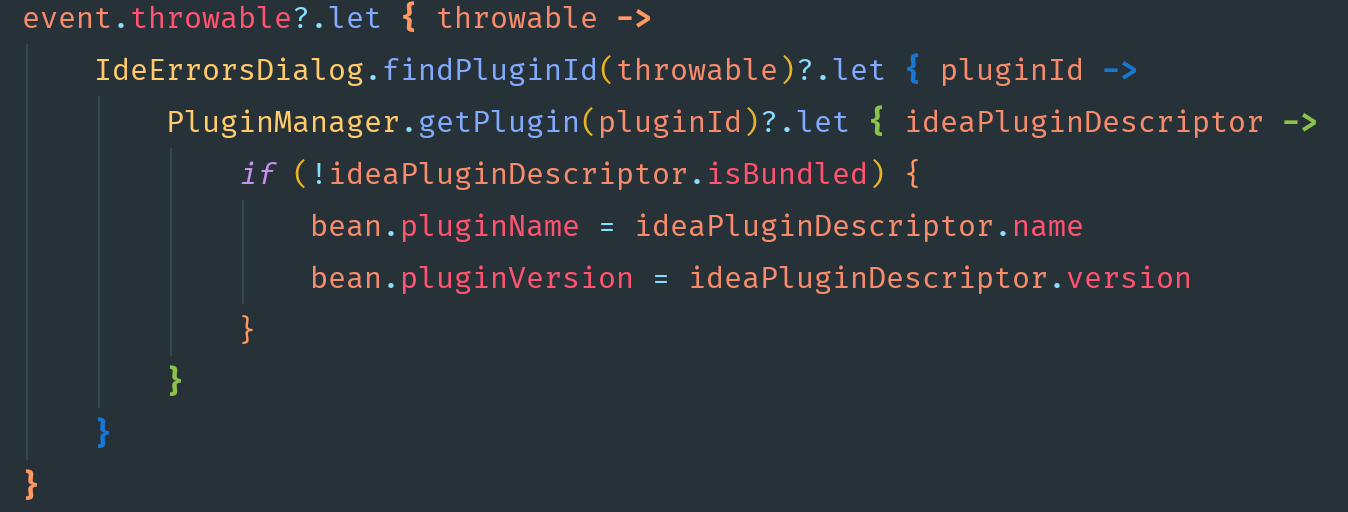

I love it 😍 Who doesn’t love some color in their life!!? 😂 Now, open your IntelliJ IDEA, head to the Plugins screen, look for “rainbow brackets” and make everything colorful 🌈
Happy coding, my friends 😉
What about VS Code?
If you work in VS Code you do not need a plugin at all: bracket pair colorization is built in. Open your settings and set "editor.bracketPairColorization.enabled": true (it is on by default in recent versions), optionally with "editor.guides.bracketPairs": true for vertical bracket guides.
FAQ
How do I install Rainbow Brackets in IntelliJ IDEA?
Open Settings → Plugins → Marketplace, search for “Rainbow Brackets”, click Install, and restart the IDE. The same steps work in Android Studio, which is built on IntelliJ.
Does Rainbow Brackets work in Android Studio?
Yes. Android Studio is based on the IntelliJ Platform, so the Rainbow Brackets plugin installs and behaves exactly the same way as it does in IntelliJ IDEA.
Is there a free version of Rainbow Brackets?
There is a free “Rainbow Brackets Lite” edition that covers bracket colorization; the full edition adds extras like custom colors and scope highlighting.